The popular advice is to standardise on one broad legal AI platform. That's often the wrong starting point. The better question is which risk your team needs to control: unsupported research, inaccurate redlines, weak source trails, confidential-data exposure, inconsistent review, or poor matter-level governance. This comparison evaluates 10 AI tools for lawyers across legal research, drafting and redlining, document analysis, diligence, discovery, and independent verification. The tools aren't interchangeable. Selection should follow the workflow, jurisdiction, source requirements, document sensitivity, governance model, implementation effort, and tolerance for cost or review latency. For each product, the practical test is the same: what evidence does it expose, how much control does it give reviewers, what does implementation require, and where does professional judgment remain essential? Disclosure: IamVera.AI is a first-party product of this publication.
Disclosure: IamVera.AI is included as a first-party product of this publication. Its feature descriptions are based on product documentation rather than independent comparative testing. Vendor feature descriptions elsewhere in this article are likewise based on current vendor documentation (checked as of August 2026) unless stated otherwise; this article does not present a measured, independent benchmark.
Adoption makes that discipline urgent. The American Bar Association's 2024 Legal Technology Survey found that 30.2% of respondents said their offices were currently using AI-based technology tools, up from 11% in 2023 (ABA 2024 Artificial Intelligence TechReport). But individual or office-level use doesn't establish firm-wide control. A tool that produces fluent text can still leave a team unable to explain which source supported a proposition, who approved a change, or whether confidential information entered an unsuitable system.
1. IamVera.AI
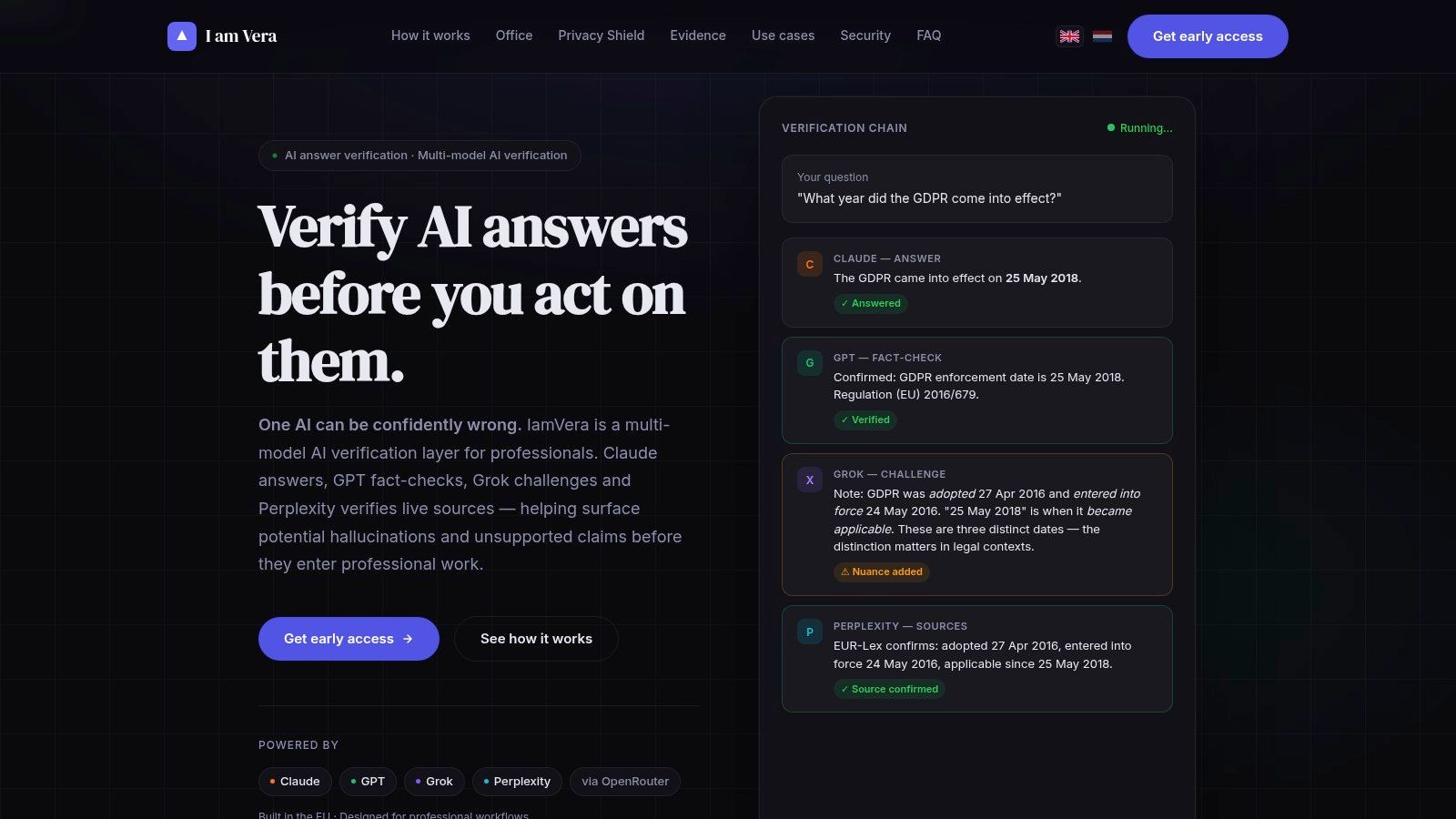
IamVera.AI addresses a specific legal-workflow problem: independent verification. Rather than treating a single generated answer as the endpoint, it routes the work through separate roles for drafting, factual auditing, adversarial challenge, and live source checking. The resulting synthesis includes confirmations, corrections, disagreements, and cited sources.
A second model alone does not establish independence. IamVera exposes the review stages so a lawyer can examine why a conclusion survived, where reviewers diverged, and which uncertainty remained unresolved. Users can configure the verification chain, choose models, set review depth, and inspect token usage and per-step costs. Raw JSON from model calls and judge outputs also supports post-hoc review, giving teams a record beyond the polished answer.
Where the workflow is strongest
The Semantic Privacy Shield locally detects and pseudonymises identifying values, checks the context before transmission, and restores originals after analysis. This may reduce exposure of names, identifiers, and other sensitive values. It does not ensure that every indirect identifier will be found, so confidentiality review remains a human responsibility.
Vera Office provides a browser-based DOCX workspace for document analysis and controlled editing. Proposed changes follow a validated action plan rather than unrestricted model writes. That creates a clearer approval point for accepting, rejecting, or revising edits. Practical uses include reviewing a case file, identifying obligations and exceptions, testing an agreement for inconsistencies, and rewriting a clause while limiting exposure of client data.
Practical rule: Set verification depth according to risk. A research note, a client-facing proposition, and a sensitive filing may require different review chains.
Trade-offs and fit
A multi-model process can cost more and take longer than a single-model response. Greater verification depth increases latency and spend. The platform does not guarantee correct conclusions, and the professional user retains responsibility for checking authorities, applying jurisdiction-specific judgment, and approving the final work. Subscription details may be limited during early access, while the product displays illustrative per-model run costs and estimated verification-run costs on its site.
For lawyers and notaries, the relevant use case is work where source grounding, privacy, disagreement visibility, and auditability outweigh the fastest first draft. The legal research and compliance workflow fits teams that need to document how a conclusion was checked, not merely receive an answer. Website: IamVera.AI
2. Thomson Reuters CoCounsel Legal
CoCounsel Legal combines research, analysis, drafting, and review within a broader Microsoft 365 environment. Its research capabilities are grounded in Westlaw and Practical Law content, while its Word integration supports clause edits, redlines, and playbook-guided changes. That makes it a plausible fit for firms that already rely on Thomson Reuters content and want fewer separate applications.
The product's value depends heavily on the distinction between access to authoritative content and correct use of that content. Source links can help a reviewer trace an answer, but they don't remove the need to read the cited authority, confirm that it applies to the relevant jurisdiction, and examine whether the synthesis omitted limiting language.
Stronger for integrated deployments
CoCounsel's Deep Research capability is intended for multi-step research rather than a single conversational response. Its Litigation Document Analyzer broadens the workflow beyond drafting. Administrative controls, usage tracking, and Microsoft 365 integrations also make the product more relevant to firms considering structured deployment instead of isolated individual experimentation.
That enterprise orientation creates a procurement trade-off. Pricing is quote-based and may be bundled with existing products, which can make comparisons difficult for smaller practices. The strongest economic and operational fit is likely to be an organisation already using Westlaw or Practical Law, with established administrators and a reason to consolidate research and document work.
Review the authority, not just the answer. A linked citation is a starting point for verification, not a substitute for legal analysis.
The human checkpoint remains clear: lawyers need to confirm the cited law, review redlines against the instruction or playbook, and decide whether the generated language preserves the client's intended allocation of risk.
Website: Thomson Reuters CoCounsel Legal
3. Westlaw Advantage
Westlaw Advantage is the most natural choice on this list when the central problem is defensible legal research inside an established Westlaw workflow. Its agentic Deep Research capability is grounded in Westlaw's legal content and citator environment, with answers linked to authority. Within Deep Research, the Verify tab lets a researcher review cited and additional relevant law to confirm the analysis is complete.
That source architecture is materially different from asking a general-purpose model to recall legal principles. A lawyer can follow the cited material into the underlying authority and use Westlaw's research ecosystem, including KeyCite, to investigate treatment, jurisdiction, and subsequent developments. The tool still can't decide whether a cited case controls a particular fact pattern, whether a statutory exception changes the result, or whether an argument is strategically advisable.
A research-first deployment
Westlaw Advantage also includes options such as Litigation Document Analyzer, Claims Explorer, AI Jurisdictional Surveys, and AI Summaries for Dockets. Those features can extend research into document and claim analysis, but they don't turn the platform into a complete matter-management or drafting environment. Note that Thomson Reuters markets AI-Assisted Research as part of a separate offering ("Westlaw Edge with AI-Assisted Research"), sold alongside Westlaw Advantage; Westlaw Advantage is the higher tier built around agentic Deep Research.
The main procurement issue is overlap. Firms comparing Westlaw Advantage with CoCounsel may find similar research and analysis language across products, while the commercial packaging and user experience differ. Advanced AI functions may require higher-cost bundles, so the decision should begin with actual research behavior and content requirements rather than feature accumulation.
A sensible evaluation should use representative matters from the firm's jurisdictions. Reviewers should record whether the system identifies controlling and adverse authority, preserves qualifiers, provides usable links, and distinguishes primary law from commentary. They should also test how the system handles a question with an intentionally narrow jurisdictional boundary.
Website: Westlaw Advantage
4. Lexis+ with Protégé
Lexis+ with Protégé is positioned as LexisNexis's generative and agentic environment for legal research and drafting. It produces source-linked outputs using primary law and Lexis content, with Shepard's-backed validation and integrations intended to support work in Microsoft 365.
Its strongest differentiator is the combination of content coverage, citator infrastructure, and drafting assistance. For a team already invested in LexisNexis, that can reduce the distance between researching an issue and incorporating supported language into a document. Configurable live web access may also help with information outside the core legal collection, but broader access increases the need to distinguish authoritative legal sources from contextual material.
What to test before adoption
Product names and features have changed, so implementation shouldn't assume that lawyers will understand the new workflow without training. A firm should test how Protégé handles a defined research question, how it presents authority, how Shepard's-related validation appears to the user, and how much of the generated draft can be traced back to a source.
The platform's pricing is sales-gated and tied to the selected content footprint. That means the effective comparison isn't just Lexis+ with Protégé against another AI assistant. It's the total cost of the relevant Lexis content, user access, integrations, training, and governance.
For high-stakes work, a lawyer still needs to open the underlying authorities, check the currentness and jurisdictional fit, and edit the draft for facts, procedural posture, and professional judgment. Source-linked generation improves the review path, but it doesn't complete it.
Website: Lexis+ with Protégé
5. Lexis Create+
Lexis Create+ addresses a narrower problem than a full research platform: finding and using relevant language while drafting in Word and Outlook. The add-in combines Lexis content with clause and definition retrieval from a firm's document management system. That places precedent reuse and authority attachment at the point where a lawyer is writing.
This workflow can be more valuable than a broad assistant when the firm's bottleneck is not discovering legal doctrine but locating approved language, prior definitions, and comparable clauses. One-click attachment of cited authorities can also support a cleaner connection between drafted propositions and their sources.
The integration dependency
The product's usefulness depends on the quality and accessibility of the firm's DMS and precedent collection. Poorly organised documents, inconsistent naming, outdated templates, or weak permissions can limit retrieval quality. The add-in doesn't repair a firm's information architecture by itself.
Central deployment and Microsoft 365 compatibility may help IT teams manage rollout, but they also make implementation an organisational project. Administrators need to define which repositories are available, who can access which precedents, and how lawyers should treat retrieved language that was approved for a different matter or risk profile.
Lexis Create+ is best assessed through drafting exercises rather than generic demonstrations. Give reviewers a clause with several relevant precedents, an authority that must be attached, and a definition whose meaning changes across agreements. Then inspect retrieval relevance, citation accuracy, permissions, and the amount of manual editing required.
Website: Lexis Create+
6. vLex Vincent AI
vLex Vincent AI is built for legal research across a broad international library, including US, EU, Latin American, and other jurisdictions. That makes it particularly relevant to cross-border and comparative matters, where a US-centric research environment may not provide sufficient coverage or context.
Its workflow emphasises retrieval from the vLex library before generation. Features include multijurisdictional research, analogical document matching, verification options, and upload-and-analyse functionality. The product also states that it maintains zero-data-retention agreements with its LLM providers; procurement teams should separately verify Vincent's own retention, storage, regional-processing, and deletion terms for the selected plan against current contractual documentation.
Cross-border coverage changes the review
A tool can retrieve relevant law without resolving the legal differences that matter most. Definitions, translation choices, procedural rules, hierarchy of authority, publication status, and local practice can all affect whether a proposition travels safely from one jurisdiction to another.
Teams should test Vincent with matters that require comparison rather than simple retrieval. Ask the system to distinguish legal rules across jurisdictions, identify the relevant primary material, and explain where analogy stops. Reviewers should record whether each proposition links to an appropriate source and whether the output makes clear which jurisdiction supports it.
Pricing varies by region and plan, and public price points are scarce. Onboarding is therefore part of the evaluation. A team should confirm content availability, data location, retention, user permissions, export controls, and support for the jurisdictions it serves.
Website: vLex Vincent AI
7. Harvey
Harvey is aimed at law firms and enterprise legal organisations that want customised agents, premium legal-data connections, and central administration across matters. In August 2026, Harvey launched Harvey II, a restructuring of the product around persistent matter and project context ("Spaces") and a personal memory layer that carries across Harvey, Word, and Outlook; at launch, the memory layer was reported to be in early access rather than generally available. Alongside it, Harvey announced Harvey Tenet - the company's first post-trained model for legal reasoning, built on an open-weight Kimi K3 base - as a research preview; production embedding was not yet confirmed at that time. Its Command Center provides usage governance, analytics, and deployment insights.
The important distinction is between an individual assistant and a governed operating layer. A firmwide deployment needs visibility into which teams use which workflows, how agents are configured, and where users need intervention. Harvey's security controls and administrative features address that deployment problem, although the organisation still has to create the policy, approval paths, and training that make those controls meaningful. Persistent context and memory also raise their own governance questions: who controls the stored matter context, how it is segregated between clients, and how it is deleted when a matter closes.
Scale increases the governance burden
Harvey offers access to a large set of legal data sources and premium primary law. The relevant question isn't how many sources are connected. Reviewers need to know which source supports a proposition, whether the source is current, and how the platform handles conflicting or incomplete authority.
Harvey remains sales-led and primarily positioned toward law firms and enterprise legal organisations, with no public self-service pricing. That can make it unsuitable for a small practice seeking a quick individual pilot. A larger firm should budget for change management, agent design, access administration, and matter-specific testing rather than treating the product as a plug-in.
A governed deployment should identify who may use an agent, what evidence it must expose, and who approves client-facing output.
That governance question is central to safe AI use for lawyers and notaries. Harvey can support scale, but it doesn't transfer professional responsibility to the platform.
Website: Harvey
8. Spellbook
Spellbook is a contract drafting and review platform focused on transactional work. It began as a Microsoft Word add-in and still centres on that embedded workflow, clause suggestions, on-document redlining, playbooks, review checklists, and tracked-change editing in the author's name, while the vendor now also offers browser-based review and drafting workflows beyond Word. For a lawyer who already drafts in Word, the embedded workflow can reduce the friction of moving documents between applications.
The product's practical value lies in controlled assistance at the clause level. A playbook can express the team's review preferences, while tracked changes make proposed edits more visible than replacing text. That still leaves a reviewer responsible for checking whether the edit matches the deal context, defined terms, schedules, governing law, and negotiation strategy.
Pilot the redline, not the demo
Spellbook offers a seven-day trial and team features such as SSO and administrative controls. The vendor also advertises zero-data-retention arrangements with its model providers; as with any such claim, verify the current contractual terms rather than the marketing page. A pilot should use real document patterns with appropriate anonymisation or approved data handling, not only a clean sample agreement. Test whether the tool follows the playbook, preserves formatting, identifies exceptions, and avoids changing language outside the requested scope.
Pricing is custom and not fully public. The tool is more likely to fit teams with structured playbooks and clause libraries than teams whose drafting standards exist mainly as unwritten habits. Without a stable review framework, suggestions may be difficult to evaluate consistently.
The final redline needs lawyer review. Tracked changes improve visibility, but visibility isn't substantive validation. A reviewer must confirm that each accepted change is legally and commercially appropriate.
Website: Spellbook
9. Litera Kira
Litera Kira is built around high-volume contract analysis, particularly due diligence and transaction review. It combines proprietary machine learning with generative AI for extraction and cross-document questions, then presents dashboards, summaries, and structured exports for deal stakeholders. Grid Chat adds cross-document Q&A over the Analysis Grid, with answers linked back to source clauses and extracted data.
That focus makes Kira different from a general legal assistant. The core value is not an eloquent answer to any legal question. It's the ability to turn a large document set into structured findings that a deal team can review, compare, export, and use in a transaction process.
Structured output needs source discipline
Clause-level citations help reviewers trace an answer to the document, but they don't eliminate sampling. A diligence team should inspect positive findings, negative findings, ambiguous provisions, missing schedules, unusual drafting, and documents that the system classified with low confidence or incomplete context.
Integrations with virtual data rooms and legal ecosystems can help transaction teams move findings into existing processes. The trade-off is scale and setup. Kira is sold through an enterprise process with quote-based pricing, and it may be excessive for an organisation that handles diligence only occasionally.
The security and privacy considerations for document redlining also apply to AI-assisted contract analysis. Teams should confirm retention, access, export, matter segregation, and whether uploaded documents can be used for any secondary purpose.
Website: Litera Kira
10. Everlaw AI
Everlaw AI is an eDiscovery and case-building platform rather than a general legal research tool. Its capabilities include predictive coding, clustering, communication visualisation, single-document AI actions, batch AI actions, and natural-language Q&A through Deep Dive, alongside drafting support. The platform is designed around evidence sets, matter controls, and audit trails that can matter in litigation workflows.
Its clearest fit is a litigation team that needs AI to operate inside a reviewable discovery process. The pricing model is usage-based per gigabyte of hosted data with unlimited users, which can make the cost structure easier to reason about than per-seat licensing, although exact price points are quote-based; core single-document AI actions are included in the per-GB rate, while batch AI actions and Deep Dive use credits or per-GB ingestion fees beyond that.
Discovery requires defensibility
A discovery workflow can't be judged only by whether the system finds useful documents. Counsel must also consider review methodology, responsiveness, privilege, confidentiality, production obligations, sampling, and the explanation that may be required if a process is challenged.
Everlaw's FedRAMP Moderate authorization and SOC 2 Type 2 attestation are relevant procurement signals, but a certification or control framework doesn't decide whether a particular matter's workflow is defensible; teams doing government work should also confirm which AI features fall within the authorized environment. The litigation team still needs to define the review protocol, document decisions, monitor results, and preserve the relevant audit information.
Unlimited users can support broader collaboration, while the product's focus on discovery means it isn't a replacement for a full legal research database. Test the platform with representative collections and record retrieval quality, source visibility, reviewer effort, export integrity, and incremental AI costs.
Website: Everlaw
10 AI Tools for Lawyers, Comparison
Feature descriptions are drawn from vendor documentation as of August 2026; this table is a workflow-fit summary, not a measured benchmark.
- IamVera.AI (first-party) — Core strength: Multi-model verification chain (draft, audit, adversarial, live sources); Verification / Privacy: Inspectable evidence trail; Semantic Privacy Shield (local pseudonymisation); human confidentiality review still required; UX & integrations: Vera Office DOCX workspace, configurable chain, token/cost visibility; Pricing model: Per-run + subscription; illustrative per-call costs shown; Best for: Lawyers, healthcare, investigators, compliance teams
- Thomson Reuters CoCounsel Legal — Core strength: Agentic legal workspace with Westlaw/Practical Law grounding; Verification / Privacy: Source-linked outputs; enterprise governance; UX & integrations: Deep Word / M365 integration, firm deployment controls; Pricing model: Enterprise / quote-based; Best for: Large firms, enterprise legal teams
- Westlaw Advantage — Core strength: Agentic Deep Research with linked authority; Verification / Privacy: Verify tab within Deep Research; KeyCite citators; UX & integrations: Westlaw workflows, Litigation Document Analyzer, Claims Explorer; Pricing model: Higher-tier bundles, quote-based; Best for: Research-intensive litigators
- Lexis+ with Protégé — Core strength: Agentic research + drafting with Shepard's validation; Verification / Privacy: Primary law + citator (Shepard's) backed verification; UX & integrations: M365 collaboration, configurable live web access; Pricing model: Sales-gated; Best for: Firms needing deep citator integration
- Lexis Create+ — Core strength: Clause retrieval and precedent reuse in Word; Verification / Privacy: One-click authority attachments; UX & integrations: Microsoft Word/Outlook add-in, DMS links; Pricing model: Enterprise rollout; Best for: Transactional teams focused on drafting
- vLex Vincent AI — Core strength: Multijurisdictional research and retrieval; Verification / Privacy: Verification options; states zero-data-retention agreements with LLM providers (verify contractually); UX & integrations: Upload/analysis, region-specific UX; Pricing model: Region/plan quoted; Best for: Cross-border practice, non-US matters
- Harvey — Core strength: Firm-scale agentic AI (Harvey II: Spaces, memory; Tenet model in research preview); Verification / Privacy: Admin controls, Command Center governance; UX & integrations: Agent customisation, Word/Outlook context carry-over; Pricing model: Sales-led, no public self-service pricing; Best for: Large firms and corporates scaling AI
- Spellbook — Core strength: Contract drafting/review with playbooks, in Word and browser; Verification / Privacy: On-document tracked changes; vendor-stated zero-retention with model providers; UX & integrations: Word integration, 7-day trial, SSO; Pricing model: Quote-based; trial available; Best for: Transactional teams piloting AI
- Litera Kira — Core strength: Contract extraction + Grid Chat Q&A for diligence; Verification / Privacy: Clause-level citations, structured exports for audits; UX & integrations: Analysis Grid, VDR & doc ecosystem integrations; Pricing model: Enterprise / quote-based; Best for: M&A, PE diligence teams
- Everlaw AI — Core strength: eDiscovery + evidence-grounded AI (Deep Dive); Verification / Privacy: Citation-backed Deep Dive, matter-level controls, audit trails, FedRAMP Moderate, SOC 2 Type 2; UX & integrations: Discovery workflows, predictive coding, matter controls; Pricing model: Usage-based per-GB, unlimited users; credits for batch AI; Best for: Litigation teams, eDiscovery specialists
Choose the Workflow Before You Choose the Tool
Start with the work product, not the vendor category. If the need is authoritative research, compare Westlaw Advantage, CoCounsel Legal, and Lexis+ with Protégé through source coverage, linked authority, citator treatment, jurisdictional precision, and the time required to validate an answer. If the need is Word-based redlining, examine Lexis Create+ and Spellbook for clause retrieval, playbook adherence, tracked-change control, permissions, and the reviewer's ability to see exactly what changed.
Other needs point elsewhere. Cross-border analysis makes vLex Vincent AI worth testing against the jurisdictions and languages in the team's matters. Precedent retrieval may favour Lexis Create+ where the DMS is well organised. Contract diligence points toward Litera Kira, while discovery and case building point toward Everlaw AI. Independent verification is a different requirement altogether, and IamVera.AI is designed around making disagreements, source checks, privacy controls, and review trails visible.
Use a written pilot rubric
A credible pilot should use representative matters, not a polished vendor demonstration. Give each tool the same type of task where possible, and record the results in a form that separates system output from reviewer judgment.
- Unsupported claims: Record every proposition that lacks adequate support or requires material correction.
- Citation quality: Check whether links lead to the relevant authority, clause, document, or evidence.
- Redline accuracy: Compare requested changes with the actual edits, including defined terms and formatting.
- Escalation points: Identify when the tool flags uncertainty, asks for clarification, or requires a lawyer to intervene.
- Latency and cost: Record waiting time and the applicable subscription, usage, credit, or bundled-cost implications.
- Reviewer effort: Measure the work needed to validate, correct, document, and approve the result.
Before adoption, confirm jurisdictional coverage and source links. Review privacy, retention, access controls, audit logs, integrations, data location, export rights, and pricing terms. Ask whether the product supports matter segregation and whether administrators can identify who used which workflow and when.
Then define mandatory human checks. A lawyer should decide whether authority is applicable, whether a redline reflects the client's instruction, whether a discovery process is defensible, and whether confidential material was handled under the firm's policy and the relevant jurisdiction's professional obligations. These tools complement authoritative legal sources, firm controls, and professional judgment. They don't replace them.
The adoption figures explain why governance can't wait. Thomson Reuters' 2025 Generative AI in Professional Services Report found that 26% of legal organisations were actively using generative AI, up from 14% in 2024. Across all professional-services respondents, 95% expected GenAI to become central to their organisation's workflow within five years. Among law-firm respondents, 78% expected it to be central within two years and 93% within five years (Thomson Reuters' report, Figure 24). Those expectations make tool selection an operating decision, not merely a software purchase.
A defensible selection process therefore asks two questions. Can the tool help with this workflow, and can the team explain, verify, govern, and take responsibility for what it produces? The second question should decide the purchase.
IamVera.AI helps legal teams verify AI-generated research and document work through independent factual checks, adversarial challenges, live source verification, privacy-preserving analysis, and visible evidence trails. Visit IamVera.AI to assess whether a configurable verification layer fits your firm's sensitive research, review, and drafting workflows.
More articles on this subject are collected in the AI in professional practice overview.
Further reading on this blog: AI for Legal Research: A Defensible Workflow for Verification and Privacy and AI output validation: from governance requirements to concrete technique.
Sources and references
Sources: Adoption figures are attributed to the American Bar Association's 2024 Artificial Intelligence TechReport; product capability descriptions are attributed to current vendor documentation from Thomson Reuters, LexisNexis, vLex, Everlaw and IamVera.AI as checked in August 2026.